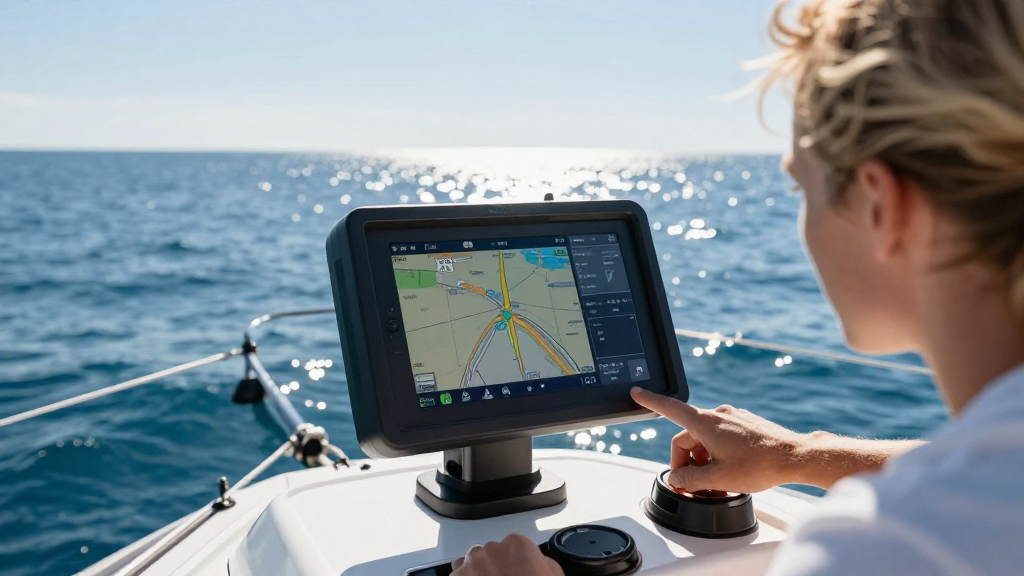
Understanding how to use electronic chartplotters is essential for any boater looking to navigate waters safely and effectively.
In this article, we will guide you through various aspects of using electronic chartplotters, from basic functionalities to advanced features.
What Are Electronic Chartplotters?
Electronic chartplotters are sophisticated devices that combine GPS data, nautical maps, and navigational tools into one interface.
They allow boaters to track their location and plot courses in real-time, enhancing navigation safety and ease.
Why Should You Use Electronic Chartplotters?
- Accuracy: Electronic chartplotters provide precise positioning, ensuring you stay on course.
- Ease of Use: Most systems have user-friendly interfaces, making navigation straightforward.
- Instant Updates: Charts can be updated instantly, providing the latest information necessary for safe navigation.
- Versatile: They can integrate with other onboard systems, such as fish finders, autopilots, and radar.
How to Use Electronic Chartplotters: Getting Started
When learning how to use electronic chartplotters, the best approach is to familiarize yourself with their components and functionalities.
What Are the Key Components?
Understanding the main features of electronic chartplotters is crucial for mastery. Here are the primary components:
- Display Screen: Typically, these are color screens that show maps, routes, and data.
- Touchscreen or Buttons: Many models feature touchscreens for easy navigation, while some retain traditional buttons for those who prefer tactile feedback.
- GPS Receiver: It helps determine your precise location and keeps you informed of your speed and course.
- Charts: You will need to have electronic nautical charts installed for accurate navigation.
How Do You Set Up Your Electronic Chartplotter?
To maximize your experience using electronic chartplotters, a proper setup is essential.
Step-by-Step Setup
-
Choose the Right Location: Mount the device where it’s easily visible and accessible while navigating.
-
Power Connection: Ensure the chartplotter is correctly connected to the boat’s power supply.
-
Install Nautical Charts:
- Purchase the necessary charts for your area.
- Install them according to the user manual.
-
Connect to GPS: Verify the GPS signal is working by checking the satellite status on your device.
-
Orientation Adjustments: Adjust the display settings to your preference, including brightness and contrast.
How to Plan a Route Using Electronic Chartplotters?
One of the most valuable features of electronic chartplotters is route planning.
Step-by-Step Route Planning
-
Select Your Start Point: Use the chart to navigate to your current location.
-
Choose Destination: Identify your intended destination on the chart.
-
Plot Your Route:
- Use the touchscreen or buttons to create a route on the display.
- Most units allow for waypoints, which are points along your journey.
-
Save Your Route: Frequently save your route to avoid losing it during navigation.
-
Review the Route: Check for potential hazards, such as shallow areas, rocks, or busy shipping lanes.
How to Use the Navigation Features?
Being acquainted with navigation features will enhance your ability to use electronic chartplotters efficiently.
Key Navigation Features
- Waypoints and Routes: Easily create, save, and follow waypoints during your journey.
- Track Functions: Monitor your speed, direction, and heading via the track function.
- Marine Alerts: Many chartplotters provide real-time alerts for weather conditions and navigational hazards.
- Auto-Pilot Integration: If compatible, connect to the autopilot system for hands-free navigation.
How to Utilize Advanced Features of Electronic Chartplotters?
Once you’re comfortable with the basics of how to use electronic chartplotters, it’s time to explore advanced functionalities to enhance your boating experience.
Advanced Features to Consider
-
Radar Integration: Integrating radar systems can help you spot obstacles or other vessels in poor visibility.
-
Sonar Technology: Use sonar features to locate fish, monitor depth, and identify underwater structures.
-
AIS (Automatic Identification System): This feature helps track nearby vessels, improving safety in busy navigational areas.
-
Weather Information: Some units can display current weather conditions and forecasts, helping you make informed decisions.
-
Chart Updates: Regularly check for updates to your nautical charts to ensure you have the most current information available.
How Should You Maintain Your Electronic Chartplotter?
Maintaining your electronic chartplotter is vital for its longevity and functionality.
Maintenance Tips
-
Keep It Clean: Regularly clean the display and unit to avoid scratches and ensure visibility.
-
Software Updates: Frequently check for software updates to enjoy the latest features and security.
-
Secure Mounting: Ensure the device is mounted correctly to avoid it becoming loose or damaged while underway.
-
Battery Care: If your device has a built-in battery, keep it charged and replace it as necessary.
-
Protect Against Water Damage: Use protective cases if your chartplotter is not waterproof.
How to Troubleshoot Common Issues?
Like any electronic device, chartplotters can encounter issues. Knowing how to use electronic chartplotters effectively involves troubleshooting common problems.
Common Issues and Solutions
-
Loss of GPS Signal: Check if your device has a clear view of the sky; obstructions can affect the signal.
-
Chart Not Displaying: Ensure your charts are installed correctly and updated to the latest version.
-
Screen Malfunction: Restart the chartplotter and check connections to resolve screen issues.
-
Battery Problems: If the device powers off unexpectedly, it may be time to check the battery or power supply.
-
Software Glitches: Complete software updates or perform a factory reset if the device behaves erratically.
Conclusion: Mastering How to Use Electronic Chartplotters
Mastering how to use electronic chartplotters can elevate your boating experience from ordinary to extraordinary.
By understanding the device setup, navigation features, and maintenance, you can navigate waters with confidence.
With practice and familiarity, you’ll be using your electronic chartplotter like a seasoned pro in no time!
Additional Resources
- Official manuals for specific brands/models
- Online tutorials and courses
- Boating communities and forums for additional tips and support
By following the advice laid out in this article, you’ll be well-equipped to tackle any waterway safely and navigate like a professional with your electronic chartplotter. Safe sailing!